

Automated Answering Service: 2026 Small Business Guide
Imagine you’re in the middle of a job, meeting with a customer, driving between appointments, or handling work that requires your full attention when the phone rings.
You may not be able to stop what you’re doing to answer every call. But for a potential customer, reaching voicemail can create friction at an important moment.
An automated answering service for small business can help companies remain responsive when owners and employees are unavailable. Instead of relying only on voicemail, modern communication systems can assist with answering routine questions, capturing customer information, routing calls, scheduling appointments, and supporting follow-up communication.
This guide explains how automated answering services work, where they can help, how they compare with live receptionists, and what businesses should consider when choosing a system.
Key Takeaways
Automated answering services can help businesses manage customer communication when employees are unavailable.
Faster responses can help keep prospective customers engaged.
Automation and live human support each have advantages, and many businesses can benefit from combining both.
Modern systems can support call routing, appointment scheduling, lead capture, and other routine workflows.
Businesses should configure automation around their actual services, hours, policies, and escalation rules.
What Is an Automated Answering Service for Small Business?
An automated answering service for small business is a software-based communication system that helps manage incoming customer interactions.
Unlike traditional voicemail, which primarily records a message for someone to return later, modern automated systems can interact with callers and perform approved tasks.
Depending on the platform and configuration, an automated answering service may help with:
Answering incoming calls
Providing business-hours information
Answering approved frequently asked questions
Capturing customer information
Taking detailed messages
Routing calls
Supporting appointment scheduling
Handling after-hours inquiries
Sending follow-up notifications
Escalating certain conversations to a person
Modern systems may use conversational artificial intelligence, automation, routing rules, and business-specific information to determine how an interaction should be handled.
The goal is not necessarily to eliminate human communication. Instead, automation can handle repeatable tasks while people remain available for situations requiring judgment, expertise, empathy, or personal attention.
The Evolution of Business Call Handling
Business communication has evolved significantly from traditional answering machines and basic automated attendant systems.
Earlier systems often relied on fixed menus such as:
“Press 1 for sales. Press 2 for support.”
Modern conversational systems can allow callers to explain what they need in their own words.
The technology can then use configured business information and routing rules to determine the appropriate next step.
For example, a caller might:
Ask about business hours
Request an appointment
Ask whether a company serves their location
Leave project information
Request a callback
Ask to speak with a specific department
A properly configured system can assist with those routine interactions while routing more complicated situations to a person.
Why Small Businesses Use Automated Communication
Many small businesses face the same challenge: the people responsible for answering customer calls are often the same people responsible for delivering the service.
A contractor may be on a job site.
A salon owner may be working with a client.
A consultant may be in a meeting.
A small team may already be helping other customers.
Automation can provide additional communication coverage without requiring employees to constantly interrupt their work.
Common reasons businesses consider automated answering services include:
Frequent missed calls
Calls arriving after business hours
Repetitive customer questions
Increasing call volume
Difficulty organizing leads
Appointment scheduling taking too much time
Customers reaching voicemail during busy periods
Employees being interrupted by routine inquiries
For many businesses, the value of automation comes from consistency and organization rather than simply replacing a person.
How Modern Automation Helps Capture Customer Opportunities
When someone contacts a business, receiving a timely response can make the experience easier and more professional.
An automated answering service can help provide that initial response when an employee is not immediately available.
For example, the system may collect:
Customer name
Phone number
Email address
Requested service
Location
Appointment preference
Reason for calling
Level of urgency
Relevant project details
That information can then be made available to the appropriate person for follow-up.
Instead of receiving a voicemail that says only, “Please call me back,” the business may receive structured information that helps the team understand what the customer needs before responding.
Supporting Missed Calls and Follow-Up
Some automated communication systems can support follow-up workflows when calls are missed or when additional customer communication is required.
Depending on the selected service and configuration, this may include SMS, email, notifications, or other follow-up tools.
These workflows can help businesses maintain communication without requiring the owner to manually respond to every interaction immediately.
Businesses should ensure that any SMS or email communication is configured in accordance with applicable consent, opt-out, and communication requirements.
Converting Customer Inquiries Into Appointments
Appointment scheduling is one area where automation can be especially useful.
For businesses that operate primarily by appointment, scheduling can consume a significant amount of administrative time.
A typical scheduling conversation may involve questions such as:
“What days are available?”
“What time can someone come out?”
“How long will the appointment take?”
“Do you service my area?”
“Can I reschedule?”
When supported integrations and scheduling tools are configured, Core Automation can help manage appointment-related workflows based on the business’s approved scheduling rules.
That may include:
Collecting appointment requests
Checking approved availability
Gathering required customer information
Supporting booking workflows
Sending confirmations
Supporting reminders
Handling rescheduling instructions
The exact functionality depends on the business configuration and integrations being used.
A Multi-Channel Communication Approach
Customers communicate with businesses in different ways.
Some prefer calling.
Others prefer email, website forms, or text messaging.
A more organized communication system can help businesses manage these interactions without forcing employees to constantly switch between disconnected tools.
Depending on the configuration, customer communication workflows may involve:
Phone calls
Voicemail
Email
SMS
Website inquiries
Appointment requests
Customer notes
Follow-up activity
Centralizing communication information can make it easier for businesses to understand what customers need and determine who should respond.
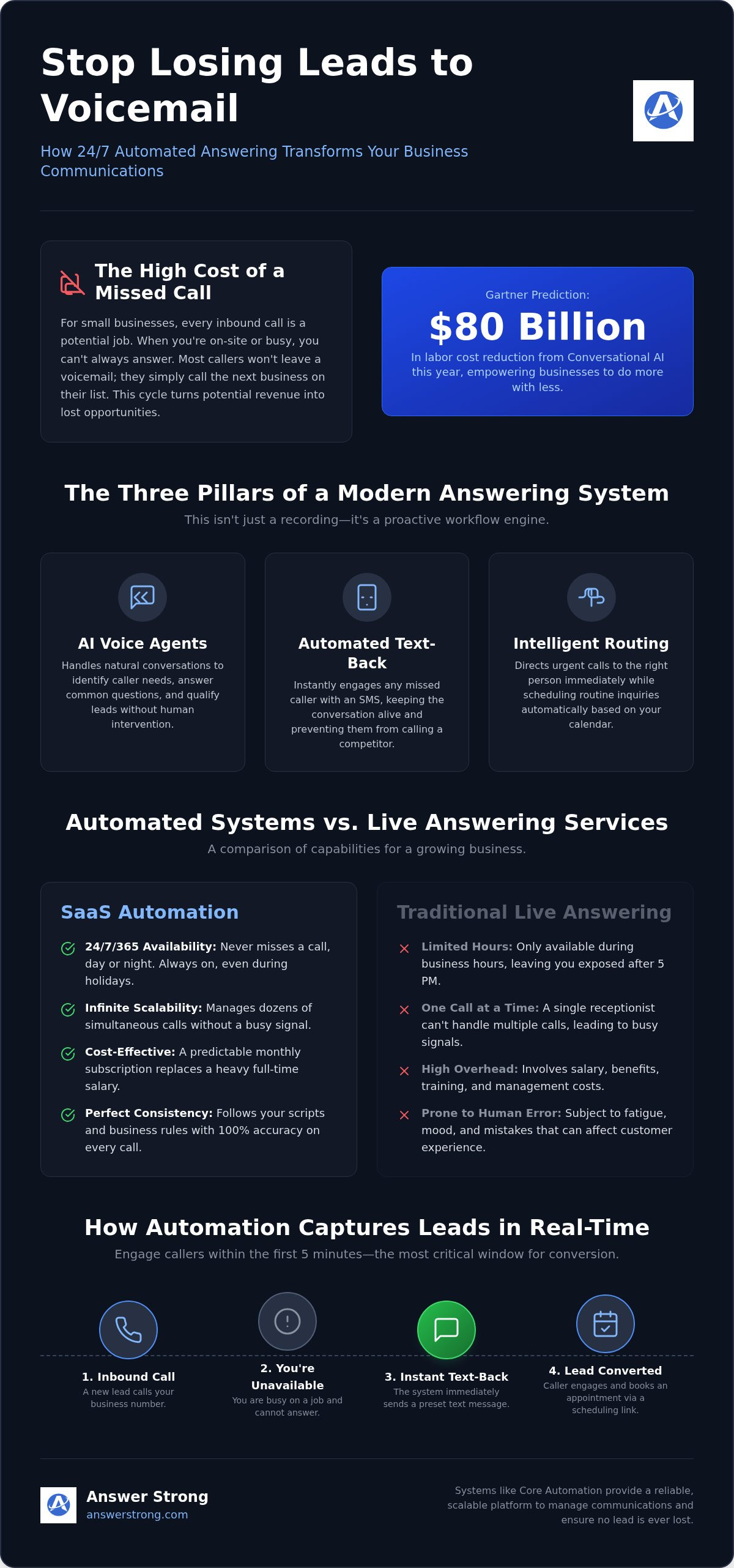
Automated vs. Live Answering Services: The Real Choice
Automation and live receptionists each provide different advantages.
A live receptionist can provide:
Human judgment
Personal interaction
Empathy
Flexibility in unusual situations
Complex problem solving
Relationship building
Automation can provide:
Routine call handling
Consistent business information
After-hours coverage
Lead information collection
Appointment support
Call routing
Overflow coverage
Repeatable workflows
The right solution depends on the business.
Some companies may use automation as their primary communication support.
Others may use it alongside an existing receptionist or customer-service team.
For example, automation may provide coverage during:
Lunch breaks
Meetings
Vacations
Sick days
Busy periods
After-hours periods
Weekends
Seasonal increases in call volume
This hybrid approach allows routine communication to be handled efficiently while employees remain available for conversations requiring human judgment.
Cost and Scalability Considerations
Cost is one factor businesses consider when comparing automated and live answering services.
A live receptionist or outsourced answering service may involve employee wages, service fees, per-minute charges, training, staffing, or other expenses.
Software-based communication services generally use subscription-based pricing.
Pricing varies considerably based on:
Number of users
Call volume
Included minutes
Features
Integrations
Automation capabilities
Phone-number requirements
Businesses should compare the actual service they need rather than choosing a system based only on the lowest advertised price.
The most useful solution is one that fits the company’s communication volume, customer expectations, workflow, and budget.
Understanding Customer Preferences
Not every customer wants the same experience.
Some people prefer speaking directly with a person.
Others value being able to quickly get information, request an appointment, or complete a routine interaction without waiting.
This is another reason businesses should avoid treating automation and human service as an either-or decision.
Automation can handle repeatable interactions while providing escalation rules for situations where a person should become involved.
Examples might include:
Complaints
Billing disputes
Complex pricing questions
Safety concerns
Unusual requests
High-value opportunities
Situations outside normal company policies
Clear escalation rules help create a better experience for both customers and employees.
Setting Up an Automated Answering System: A 5-Step Guide
Implementing an automated answering service starts with understanding how your business currently communicates with customers.
Step 1: Choose Your Business Number
Determine whether you want to use an existing number or obtain a new business number.
Depending on availability and configuration, businesses may choose:
A local number
A toll-free number
An existing business number
Call forwarding from an existing number
Number transfer or porting where supported
Local and toll-free number availability may vary based on provider inventory and carrier requirements.
Step 2: Define Your Availability
Determine when customers should receive automated assistance and when calls should be routed to a person.
Your settings may include:
Normal business hours
After-hours rules
Weekend rules
Holiday schedules
Department availability
Staff availability
Step 3: Define Your Communication Workflow
Decide what should happen when different types of customers contact your business.
For example:
A new customer may need lead information collected.
An existing customer may need to reach a specific department.
An appointment request may need scheduling assistance.
A complicated complaint may need immediate human escalation.
Your automation should reflect the way your business actually operates.
Step 4: Provide Approved Business Information
Your automated system is only as useful as the information it has available.
Provide accurate, current information such as:
Business hours
Services
Service areas
Frequently asked questions
Appointment policies
Pricing guidance
Routing instructions
Customer-service policies
Escalation rules
Staff or department information
A structured knowledge base can help keep customer responses consistent.
Step 5: Test Before Going Live
Always test your communication workflow before relying on it for customers.
Call the system yourself.
Ask routine questions.
Try unusual questions.
Test appointment requests.
Test call routing.
Test escalation scenarios.
Testing helps identify areas where instructions, routing rules, or business information need to be adjusted.
Setup time will vary depending on the services selected and the complexity of the business workflow.
Customizing Automation for Different Industries
Different businesses need different communication workflows.
An HVAC company may want urgent heating or cooling issues routed differently from routine estimate requests.
A plumbing company may need separate rules for emergency service and normal appointments.
A salon or barbershop may prioritize appointment scheduling and service information.
A consulting company may focus more heavily on lead qualification and meeting requests.
A home-service company may need to collect:
Customer location
Type of service
Urgency
Property details
Preferred appointment time
The goal is to configure automation around the business rather than forcing every company into the same generic call script.
Integrating With Existing Business Tools
Communication systems become more useful when they can work with the other tools a business already uses.
Depending on supported integrations and account configuration, automation may work with business tools such as:
Calendars
CRM systems
Website forms
Email
SMS
Scheduling tools
Customer records
AnswerStrong may also support fax-related functionality such as Fax-to-Email where configured.
Businesses should verify which integrations and features are currently supported before building workflows around a specific third-party application.
AnswerStrong: Business Phone Services and Core Automation
AnswerStrong is a business communication platform designed to help businesses organize phone calls, customer inquiries, appointments, messages, and routine communication.
Businesses can use AnswerStrong to obtain a professional local or toll-free business number or connect an existing number depending on their setup.
Business phone functionality may include:
Call forwarding
Call routing
Business-hours rules
After-hours routing
Voicemail
Voicemail-to-email
Call activity
Call recordings where enabled
Fax-to-email
Usage tracking
Communication management through the AnswerStrong dashboard
For businesses that need more than traditional phone service, AnswerStrong offers Core Automation.
What Is AnswerStrong Core Automation?
Core Automation is AnswerStrong’s business communication automation platform.
It can be configured to help businesses manage approved and repeatable communication tasks, including:
Handling incoming calls
Answering approved customer questions
Collecting lead information
Supporting lead qualification
Scheduling or requesting appointments
Taking detailed messages
Routing callers
Supporting after-hours communication
Recording customer details
Supporting follow-up workflows
Escalating conversations that require human assistance
Core Automation uses information provided by the business, such as hours, services, FAQs, policies, scheduling rules, routing instructions, and escalation preferences.
The purpose is not to eliminate the human side of customer service.
Instead, automation handles routine communication while owners and employees can focus on service delivery, decision-making, complex conversations, and situations where human involvement adds the most value.
Supporting Existing Employees and Receptionists
AnswerStrong does not have to replace an existing receptionist.
Core Automation can also provide additional coverage for businesses that already have employees answering customer calls.
For example, automation may provide support during:
Lunch breaks
Meetings
Vacations
Sick days
Busy call periods
After-hours periods
Weekends
Seasonal demand
This can help businesses maintain more consistent communication while allowing employees to focus on customers who require personal assistance.
Preparing Your Business for Growth
As a business grows, communication usually becomes more complicated.
There may be:
More incoming calls
More appointment requests
More customer questions
More leads
More employees
More locations
More follow-up tasks
Without an organized system, growth can make customer communication harder to manage. A stronger communication structure can help businesses handle increasing demand without forcing employees to choose between serving existing customers and responding to new ones. AnswerStrong is designed to support that structure with professional business phone services and Core Automation.
Build a More Responsive Business Communication System
Customers expect businesses to be organized and responsive.
That does not mean an employee must personally answer every interaction.
It means the business needs a reliable process for determining what customers need and what should happen next.
Professional phone services, routing rules, scheduling workflows, customer-information capture, and carefully configured automation can help create that process.
AnswerStrong combines business phone functionality with Core Automation to help businesses manage routine communication while keeping people involved when human judgment matters.
Frequently Asked Questions
What is an automated answering service for small business?
An automated answering service for small business is a software-based platform that helps manage incoming customer communication. Depending on the system, it may answer routine questions, collect customer information, support scheduling, route calls, take messages, and escalate certain interactions to employees.
Will customers be frustrated by an automated system?
Customer preferences vary. Some customers prefer speaking with a person, while others prefer getting information or completing routine tasks quickly. A well-configured system should provide clear information and make it easy to reach a person when the situation requires human assistance.
How much does an automated answering service cost?
Pricing varies significantly depending on call volume, included minutes, automation features, integrations, phone-number requirements, and service provider. Businesses should compare current plans and capabilities based on their specific communication needs.
Can an automated answering service schedule appointments?
Many modern communication platforms can support appointment workflows. With AnswerStrong, available scheduling functionality depends on the business configuration, scheduling rules, and supported integrations.
Do I need special hardware to use AnswerStrong?
A separate physical phone is not necessarily required. Depending on the configuration, calls can be routed to existing mobile phones, office phones, employees, departments, or other approved destinations.
What happens when a caller needs a person?
Core Automation can be configured with routing and escalation rules. Conversations involving complaints, unusual requests, complex questions, urgent situations, or other issues requiring human judgment can be directed to the appropriate person or destination.
Can I keep my existing business phone number?
Depending on the existing provider and configuration, businesses may be able to connect an existing number through call forwarding or supported number-transfer processes. Porting timelines and requirements vary by carrier, number type, and documentation.
Can I get a new local or toll-free number?
AnswerStrong can provide access to local and toll-free business numbers subject to provider availability and applicable requirements.
Does AnswerStrong replace a receptionist?
Not necessarily. Some businesses may use Core Automation as their primary communication support, while others may use it alongside an existing receptionist or team for overflow, after-hours, vacation, sick-day, or busy-period coverage.
How long does it take to set up AnswerStrong?
Setup time depends on the service selected and the complexity of the business workflow. A basic business phone configuration may require less setup, while Core Automation may require information about services, hours, routing rules, FAQs, scheduling preferences, and escalation procedures.
Does AnswerStrong guarantee more leads, appointments, or revenue?
No. AnswerStrong is designed to help businesses improve communication workflows and responsiveness. Business outcomes depend on many factors beyond the communication platform.
Ready to Strengthen Your Business Communication?
AnswerStrong helps businesses manage professional phone communication and routine customer workflows through business phone services and Core Automation.
Whether you need a professional business number, better call routing, appointment support, after-hours coverage, or a more organized way to manage customer communication, AnswerStrong can help you build a system designed around the way your business operates.
Explore AnswerStrong and see how Core Automation can support your business.



Comments