

Automated Call Routing for Law Firms: 2026 Efficiency Guide
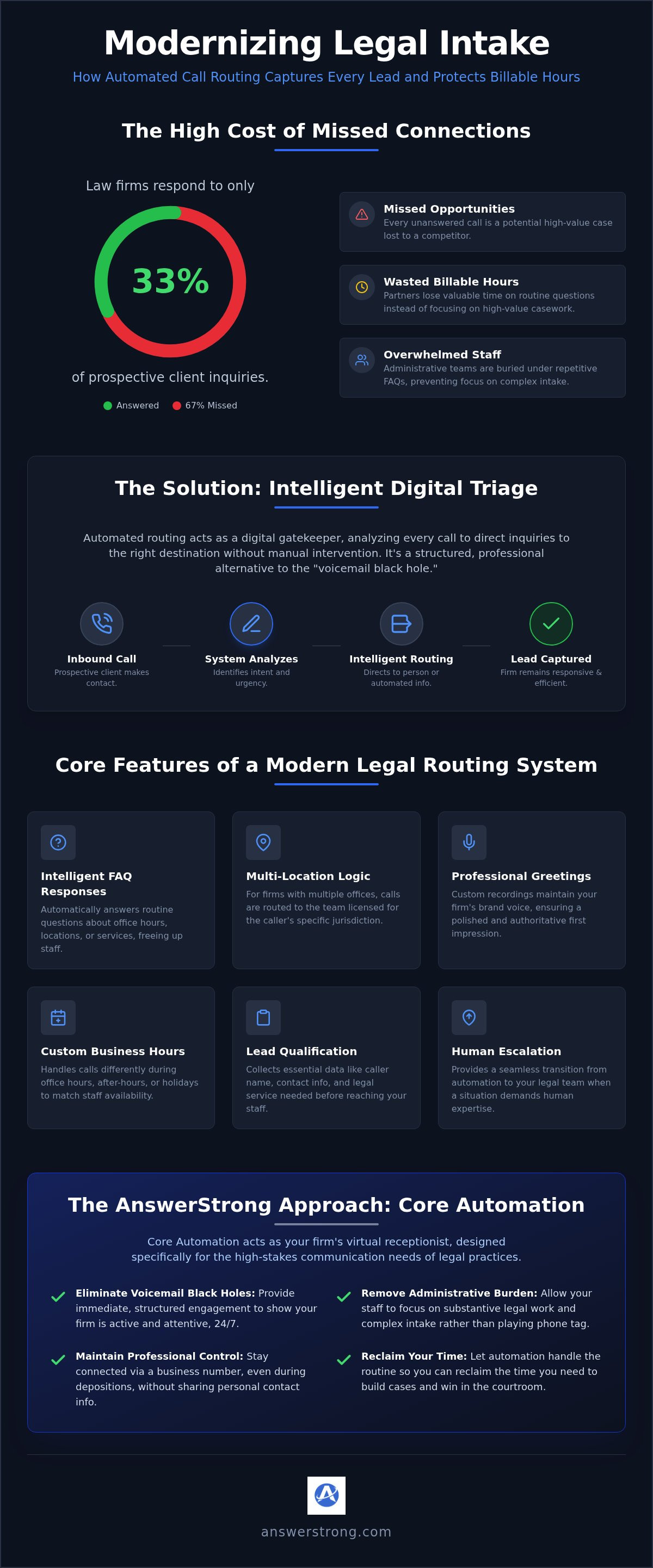
Law firms currently respond to only 33% of inquiries from prospective clients, even as consumer expectations for immediate answers reach an all-time high. It's a staggering gap. You've likely felt the sting of losing a high-stakes case because you were in a deposition when the phone rang. Administrative staff are often buried under routine FAQs, leaving them little time to handle complex intake. You know that every missed call is a missed opportunity. Your partners must protect their billable hours for high-value work. Implementing automated call routing for law firms is a vital step for modern practices.
This 2026 efficiency guide reveals how intelligent call routing protects your firm's productivity. You'll discover how to direct inquiries to the right professional without manual intervention. We'll show how Answer Strong and its Core Automation act as a virtual receptionist to handle routine tasks while routing critical matters to your human team. We'll cover the transition from digital triage to staff intervention and how to stay responsive even during depositions or after-hours without the high cost of live answering services. Our goal is to help you capture every lead accurately while preserving your time for the courtroom.
Table of Contents
What is Automated Call Routing for Law Firms?
Modern legal practices don't just answer phones; they manage high-stakes communication flows. At its core, automated call routing for law firms is a sophisticated system that triages inbound inquiries based on logic rules. Unlike a basic auto-attendant that simply offers a list of extensions, these systems function as an Automatic Call Distributor (ACD), intelligently directing callers based on the nature of their legal matter, the time of day, or the current availability of the legal team.
The primary goal is simple: protect your billable hours. Every minute an attorney spends answering routine questions about office hours or basic filing fees is a minute lost to high-value casework. Intelligent intake workflows distinguish between a general inquiry and a high-value lead ready to sign a retainer. This digital triage ensures that your expertise is only deployed when it's truly needed. It's a proactive way to maintain control over your schedule while ensuring the firm remains accessible.
The Role of Digital Triage in Legal Intake
In 2026, responsiveness is a non-negotiable competitive advantage. Digital triage identifies the urgency of every call immediately. A new personal injury inquiry can be routed to an intake specialist, while an existing client checking on a court date receives an automated status update. This immediate engagement keeps leads from calling the next firm on the list. It provides a seamless transition from an automated greeting to human escalation when the situation demands it.
Why Firms are Moving Away from Traditional Voicemail
Traditional voicemail is where legal leads go to die. When a potential client hears a beep instead of a voice or a helpful menu, they often hang up. They don't wait for a callback; they call your competitor. Automated routing provides a structured alternative that maintains a professional image even when you're in court or a deposition. It creates a bridge between automated responses and your human staff.
Firms are increasingly adopting Core Automation from Answer Strong to replace these "voicemail black holes." By providing immediate engagement, you demonstrate that your firm is active and attentive. It removes the administrative burden from your staff, allowing them to focus on substantive legal work rather than playing phone tag with routine inquiries. This shift isn't just about technology; it's about reclaiming the time you need to win cases.
Essential Features of a Legal Call Routing System
Implementing automated call routing for law firms requires more than just a standard greeting. It requires a logic-based engine that understands the nuances of legal practice. While generic phone systems offer basic menus, a dedicated legal solution triages callers based on urgency, case type, and staff availability. These systems align with industry standards regarding essential features for a law firm's phone system, ensuring your practice remains responsive without compromising attorney focus.
A professional system provides several core functions to streamline your front-end operations:
Intelligent FAQ Responses: Automation handles routine questions about office locations, basic service areas, or parking. This keeps your lines open for substantive case discussions.
Multi-Location Logic: For firms with several regional offices, the system routes calls to the specific team licensed for that jurisdiction.
Professional Greetings: Custom recordings maintain your firm's brand voice, ensuring every caller experiences a polished, authoritative first impression.
Customizable Business-Hours Routing
Your firm's needs change throughout the day. Modern routing handles calls differently during standard office hours compared to after-hours or holidays. When you're in court or a deposition, the system can route calls to your mobile phone via a business number. This allows you to stay connected without sharing your personal contact information. It creates a professional barrier while maintaining accessibility. Answer Strong provides multiple service options to customize these paths based on your specific caseload and staffing levels.
Lead Qualification and Data Collection
Capturing a lead is only the first step. Automation can collect essential data like the caller's name, contact info, and the specific legal service they need. This process qualifies the lead before a human attorney ever picks up the phone. You receive a summary of the inquiry, allowing you to prioritize high-value cases. In 2026, 30% of lawyers reported using AI-based tools for these types of intake workflows. Where enabled and legally permitted, call recording and transcription provide an accurate record of these initial interactions. This data-driven approach ensures your team has the context they need for a productive initial consultation. If you want to see how these workflows function in practice, exploring Core Automation from Answer Strong is a natural next step for modernizing your intake.
Automated Routing vs. Traditional Legal Answering Services
Deciding between a live answering service and automated call routing for law firms often comes down to two factors: cost and consistency. Traditional answering services usually charge by the minute. This makes your monthly expenses unpredictable. If you have a high-volume month due to a new marketing campaign, your administrative bill spikes. Automated systems operate on a subscription basis. This provides a predictable overhead that doesn't punish you for being successful. You get the same level of service regardless of how many leads dial your number.
Consistency is another area where technology provides a distinct advantage. Human receptionists can have off days, get overwhelmed during peak hours, or misinterpret complex legal intake instructions. An automated system follows your logic rules without variation. It greets every caller with the same professional tone and follows your exact triage path. This reliability ensures that your firm's brand remains untarnished by variable human performance or staffing shortages.
Comparing Costs and Scalability
Scalability is a significant hurdle for firms relying solely on live staff. A single receptionist can only handle one call at a time. If three high-value leads call simultaneously, two will likely end up in a voicemail queue. Automated systems handle concurrent calls without delay. No one waits on hold. You can start with an Essential Plan to manage basic routing and expand as your caseload grows. This allows you to scale your intake capacity without the high cost of hiring and training new administrative personnel. It provides a "safety net" for your firm during busy periods or when your primary staff is unavailable.
The Hybrid Approach: Automation with Human Escalation
The most successful modern practices don't view automation as a replacement for human staff. Instead, they use it as a digital triage engine. Automation handles the routine tasks that drain your time. It answers FAQs, collects initial case data, and filters out solicitors. This ensures your human team is only interrupted for high-value, judgment-based interactions. When a serious inquiry is identified, the system routes it directly to your legal staff for that personal touch.
This hybrid model preserves the "white glove" experience for your best clients. They get immediate engagement from the system followed by a seamless transition to a professional advocate. You can Learn more about Core Automation to see how this workflow engine manages lead capture for professional firms. By using technology to handle the "first touch," you protect your partner's time for billable work while ensuring every potential client feels heard.
How to Implement Call Routing Logic for Your Firm
Implementing automated call routing for law firms requires a strategic map of your internal workflow. You aren't just setting up a menu; you're building a digital bridge between a prospect's problem and your legal solution. Start by tracing the typical client journey from the first ring. Every touchpoint should serve a purpose, whether it's gathering data or providing immediate answers to routine questions. This proactive approach ensures your firm remains a "never-sleeping" advocate for its clients.
The first step involves identifying which calls require human intervention and which can be handled by logic rules. A caller seeking an update on a divorce filing has different needs than someone arrested for a DUI. You must establish clear escalation paths for emergency legal matters. These high-stakes calls should bypass routine triage and route directly to a designated on-call professional. For non-emergencies, integrate the system with your existing calendars. This allows the automation to book consultations directly, removing the back-and-forth of manual scheduling and protecting your staff's time.
Mapping Your Intake Workflow
Identify the specific departments within your firm. Inquiries should route to billing, associates, or partners based on the caller's selection. You can set up specific routing rules for different practice areas. Family law inquiries might route to a paralegal for initial intake, while criminal defense leads escalate to a senior partner. This ensures your high-value staff only handles high-value conversations. For a broader look at these systems, see the 2026 Guide to Automated Customer Communication Platforms to understand how modern firms manage these connections.
Testing and Refining Your Routing Rules
Your setup shouldn't be static. Use a centralized dashboard to track activity and monitor call logs. This data reveals where prospects might drop off or which menu options are used most frequently. If many callers ask a specific question not covered in your menu, update your FAQ responses to address it. Call summaries provide the context needed to improve your intake scripts over time. A flexible system allows you to adjust routing settings easily as your firm adds new associates or expands into new jurisdictions. This iterative process ensures your communication engine remains efficient as your caseload evolves.
Ready to build a more responsive practice? Explore how Core Automation can manage your firm's intake logic and protect your billable hours.
Modernize Your Legal Intake with AnswerStrong
Modern law firms require a communication engine that works as hard as their partners. AnswerStrong provides a comprehensive platform designed for the specific demands of the legal profession. By implementing automated call routing for law firms, you ensure that your practice remains responsive even when you're in the middle of a high-stakes trial. Our system acts as a digital triage center. It handles the initial contact, qualifies leads, and directs inquiries to the right professional without requiring constant manual oversight.
Core Automation is the heart of this system. It manages appointments and captures lead data with surgical precision. It doesn't just take messages; it drives your workflow. You can choose to secure new business phone numbers or integrate your existing lines into the platform. This flexibility allows you to maintain your established professional presence while upgrading the underlying technology. You stay organized. You stay responsive. Most importantly, you protect the billable hours that drive your firm's growth.
Why AnswerStrong Fits the Legal Profession
Professionalism is non-negotiable in law. AnswerStrong maintains a clear, business-focused tone that reflects your firm's authority. You gain full visibility through a centralized dashboard at portal.answerstrong.com. This allows you to track every interaction, review call summaries, and monitor firm-wide activity in real-time. It provides the data you need to make informed decisions about your staffing and intake strategies. You can Explore AnswerStrong Services to see how our tools align with your specific operational goals.
Getting Started with Intelligent Automation
Every firm has a unique structure. AnswerStrong offers multiple service options based on your specific needs, whether you're a solo practitioner or a multi-partner organization. If you're looking for broader context on how these systems benefit smaller practices, read our Automated Answering Service: 2026 Small Business Guide. This resource explains the foundational benefits of digital intake for growing businesses. To see our current plans and feature sets, visit AnswerStrong.com for current pricing. Take control of your intake logic today and build a more efficient, lead-focused practice.
Take Control of Your Practice Communication
The legal market in 2026 demands immediate responsiveness. You can't afford to let high-value leads slip through the cracks while you're focused on casework. Implementing automated call routing for law firms transforms your intake from a manual burden into a high-speed efficiency engine. It's about more than just answering phones. It's about protecting your billable hours and ensuring every inquiry is handled with professional precision.
You now have the framework to move beyond the limitations of traditional voicemail and expensive live answering services. By using professional Core Automation for routine legal intake, you provide 24/7 responsiveness for your firm without increasing your staffing costs. You can monitor every interaction through a centralized dashboard for call activity tracking. This level of visibility ensures you stay organized and proactive as your caseload grows. It's time to let technology handle the triage so you can focus on winning cases. Find the Right AnswerStrong Setup for Your Firm and start building a more resilient practice today.
Frequently Asked Questions
What is automated call routing for law firms?
It is a logic-based system that triages and directs inbound phone calls to the appropriate team member or department. For legal practices, automated call routing for law firms ensures that high-value leads are separated from routine administrative inquiries. This digital triage allows attorneys to focus on billable work while Core Automation handles the initial contact. It provides a structured workflow that maintains a professional image without constant manual monitoring.
Can call routing handle after-hours inquiries for my firm?
Yes, the platform is designed to maintain responsiveness 24/7 through customizable business-hours routing. When your office is closed, Core Automation can take over to provide FAQ responses, capture lead details, or take detailed messages. This ensures that potential clients who call late at night don't reach a dead-end voicemail. Instead, they receive immediate engagement, which significantly improves the firm's overall responsiveness and lead retention during non-business hours.
Does automated routing replace the need for a legal receptionist?
Not necessarily. While the system can function as your primary support, it's often used to work alongside existing staff. It provides essential overflow coverage during busy periods, sick days, or when your receptionist is handling other tasks. Automated call routing for law firms acts as a virtual receptionist that manages routine, repeatable communication. This allows your human team to focus on complex, judgment-based interactions that require a personal, specialized touch.
Can I keep my existing law firm phone number with AnswerStrong?
Yes, you can maintain your established professional identity by integrating your current number. This is typically done through call forwarding or supported number-transfer processes, subject to your current provider's configuration constraints. Alternatively, AnswerStrong can provide new local or toll-free business phone numbers if you're looking to expand or separate your business lines. This flexibility ensures a seamless transition to intelligent automation without disrupting your existing client connections or marketing materials.
How does automated routing help with legal appointment scheduling?
The system integrates with your existing calendars to automate the booking process based on your specific scheduling rules. Core Automation can qualify a lead first and then offer available time slots for a consultation. This removes the administrative back-and-forth often associated with manual scheduling. It ensures that your calendar stays organized and that appointments are only set for leads who have provided the necessary preliminary case information through the automated system.
Is call routing difficult to set up for a small firm?
No, the platform is built for ease of use and quick implementation for firms of all sizes. You can start with a simple setup and add more complex automation layers as your practice grows. All settings are managed through a centralized dashboard at portal.answerstrong.com, where you can update your routing logic in real-time. This user-friendly interface makes it practical for small firms to deploy sophisticated communication workflows without needing a dedicated IT department.
Can the system transfer calls to an attorney’s mobile phone?
Yes, calls can be routed to mobile phones, office lines, or specific departments based on your escalation rules. This feature is particularly useful for attorneys who are frequently in court or traveling between offices. It allows you to stay connected to your firm's communication engine without sharing your personal mobile number with the public. You maintain your professional presence while enjoying the mobility required by a modern, high-stakes legal career.
How does the system handle potential client lead capture?
Core Automation handles lead capture by collecting approved customer details such as name, contact info, and the type of legal services requested. The system can gather specific case details to qualify the lead before any human intervention occurs. You receive a detailed call summary and transcription through your dashboard, giving you the context needed to prioritize follow-ups. This ensures that every potential client is accurately documented and never lost to a voicemail queue.



Comments