

How to Sync Your Phone System with Outlook Calendar in 2026
60% of companies now use automation in their workflows to stay competitive. Yet, many businesses still lose hours to manual data entry and the frustration of double-booked appointments. When you sync phone system with outlook calendar, you stop reacting to your schedule and start commanding it. It's the difference between a chaotic desk and a streamlined operation that runs while you focus on high-level growth.
You know the stress of missing a customer's detail during a live call or realizing two clients were promised the same time slot. These administrative leaks drain your energy and hurt your professional reputation. This guide shows you how to bridge the gap between your incoming calls and your daily agenda. You'll learn to leverage the Microsoft Graph API for automated, real-time booking that eliminates scheduling conflicts. We'll explore how modern phone systems act as an invisible motor, driving your business forward with reduced overhead and a superior customer experience.
Table of Contents
Why Syncing Your Phone System with Outlook Calendar is Essential for 2026
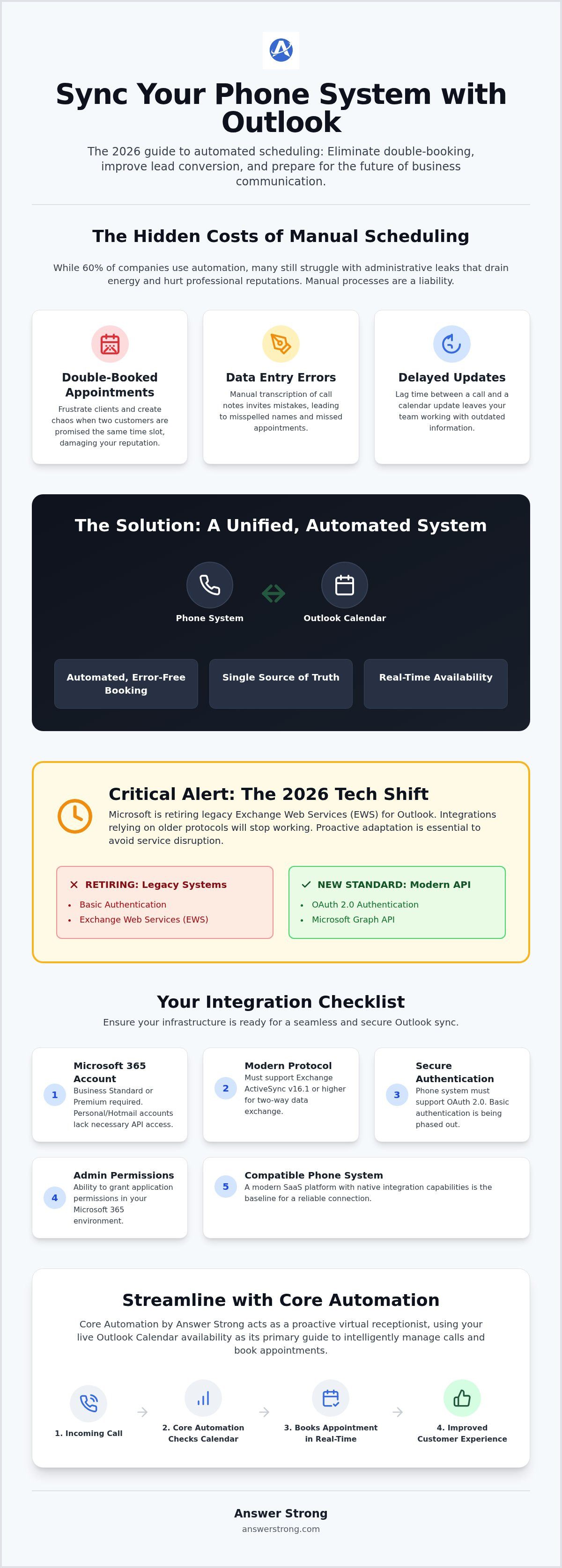
A phone-to-calendar sync is the real-time exchange of data between your communication software and your scheduling platform. It's no longer a luxury. In 2026, it's the standard for professional operations. Most businesses rely on the Microsoft 365 ecosystem to manage their daily workflows. By choosing to sync phone system with outlook calendar, you turn a simple directory into a dynamic scheduling engine. This integration removes the administrative tax that burdens small business owners. You spend less time shuffling papers and more time closing deals. Research shows that 88% of organizations now use AI or automation in at least one business function. Staying manual means falling behind.
Leveraging Microsoft Outlook's calendaring features allows your phone system to see exactly when you're free without you lifting a finger. This visibility creates a professional customer experience from the very first interaction. When a caller hears that you have an opening at 2:00 PM today, they feel prioritized. They don't have to wait for a return call that might never come. This immediate connection builds a foundation of trust that is difficult for competitors to break.
The End of Manual Scheduling Entry
Manual data entry is a liability. It invites human error, creates delayed updates, and leads to the nightmare of double-booking. When you rely on a person to transcribe call notes into a calendar, things go wrong. Appointments get missed. Names get misspelled. Automation changes the game. When you sync phone system with outlook calendar, you establish a single source of truth for your entire team. Everyone sees the same availability in real time. This organization provides a massive psychological benefit. You can end your day knowing your digital schedule is accurate and under control. It eliminates the "did I forget something?" anxiety that keeps business owners awake at night.
Improving Lead Conversion for Service Providers
For service professionals like HVAC technicians, plumbers, and salon owners, speed is everything. A customer in an emergency won't wait for a callback. Real-time synchronization ensures that every available slot is visible to callers, preventing "lead leakage" where potential customers call a competitor because they couldn't get a firm commitment on the first try. Instant responsiveness builds immediate trust. It signals that your brand is professional, modern, and ready to solve problems. This level of service turns a simple inquiry into a loyal, long-term client. By automating this workflow, you ensure your business remains active and profitable even when you are busy on a job site.
Technical Prerequisites for a Successful Outlook Integration
You can't build a high-performance system on shaky ground. Before you try to sync phone system with outlook calendar functionality, you must verify your technical infrastructure. Many users mistakenly believe that standard email protocols like IMAP or POP are sufficient. They aren't. While those protocols handle message retrieval, they lack the intelligence to manage calendar events. You need a dedicated sync protocol that supports two-way data exchange. This ensures that when a call is booked, the slot is instantly blocked on your screen across all devices.
Security is just as critical as the connection itself. Your phone system must support modern authentication standards, specifically OAuth 2.0. Microsoft is phasing out basic authentication to protect business data from unauthorized access. You'll also need administrative permissions within your Microsoft 365 environment. You may need to grant Application Permissions so your communication platform can read and write to your calendar folders without a manual login every time. A stable internet connection and a robust SaaS platform are your baseline requirements for keeping this invisible motor running.
Understanding Microsoft Exchange ActiveSync
As of March 1, 2026, Microsoft requires Exchange ActiveSync version 16.1 or higher for all service connections. This version is the industry standard for mobile and third-party synchronization. It allows your phone system to push and pull data simultaneously. If you've ever tried to sync Outlook with a mobile device, you've likely seen this protocol in action. It's vital to use business-grade Microsoft 365 accounts, such as Business Standard or Premium. Personal Outlook.com or Hotmail addresses often lack the API access needed for a professional sync phone system with outlook calendar setup.
Phone System Compatibility Check
Not every VoIP provider is ready for the demands of 2026. You must check if your current vendor offers a native Calendar Connector or open API access. Without these, you're stuck with manual entry and the errors that come with it. If your current system feels outdated, you don't have to start from scratch. Modern solutions like Core Automation bridge the gap between your existing phone numbers and your Outlook calendar. This SaaS platform acts as the brain of your operation, interpreting incoming calls and matching them to your real-time availability. It's a proactive way to ensure your schedule stays full without the administrative headache.
Step-by-Step Guide: Connecting Your Business Phone to Outlook
Most online guides only explain how to toggle a switch in a mobile app. That isn't a professional integration. To truly sync phone system with outlook calendar, you must link your communication dashboard directly to the Microsoft Graph API. Start by logging into your business communication portal. Navigate to the "Integrations" tab and select Microsoft 365. Authenticate using your administrative credentials. This secure handshake allows your systems to share data without manual intervention or constant logins.
Once authenticated, follow these specific steps to finalize the connection:
Define Folder Routing: Don't dump every appointment into your primary calendar. Select or create specific folders for service categories like "On-site Repairs" or "Initial Consultations."
Set Boundaries: Define your working hours within the dashboard. If you only take calls from 8 AM to 5 PM, ensure the system respects these limits regardless of what your Outlook settings say.
Establish Buffers: Add "Buffer Times" between appointments. If a plumbing job typically lasts an hour, a 20-minute buffer ensures you have time to travel and reset before the next slot begins.
Enable Two-Way Sync: This is vital. It ensures that if you manually delete an event in Outlook, the phone system immediately recognizes that time as available again.
Configuring Your Availability Rules
Automated rules act as your digital gatekeeper. You can set a "lead time" requirement, such as two or four hours. This prevents a caller from booking an appointment for 10:00 AM when it's already 9:55 AM and you're currently on a job site. If you manage a crew, link multiple calendars to the system. The automation will check the collective availability of your technicians. It only offers slots where a qualified team member is actually free to work. This logic keeps your operation running smoothly without you ever picking up the phone.
Testing the Integration
Never assume the connection is active until you've seen it work. Conduct a test call to your business line. Speak to your automated system and book a dummy appointment. Open your Outlook desktop and mobile apps to verify the event appears within seconds. Check the event description carefully. It should map the caller's name, phone number, and service type accurately into the notes section. If you experience a "Sync Lag," check your app permissions in the Microsoft Entra ID portal. A reliable sync phone system with outlook calendar setup ensures you never miss a detail during a busy workday.
Comparing Direct Sync vs. Third-Party Automation Tools
Choosing how to sync phone system with outlook calendar functionality usually leads to two paths. You can use a native integration built into your communication platform or rely on middleware like Zapier. Each has its place. However, the choice you make impacts your speed, security, and monthly overhead. Middleware acts as a bridge between two separate islands. Native sync is the island itself. It's more stable because it doesn't rely on a third party to stay functional while you're trying to run your business.
When to Use a Direct Integration
Direct integrations offer the lowest latency. There is no middleman to slow down the data transfer. For service professionals, this "set it and forget it" approach is often the best choice. Setup is simple. It's usually included in your primary service fee, saving you from extra subscription costs. Answer Strong handles this internally through its Core Automation platform. It treats your calendar as a direct extension of the phone system. This reduces the risk of "broken links" that occur when third-party software updates without warning. It's a cleaner, more reliable way to manage your business. You get a unified dashboard where everything works in harmony without constant supervision.
The Role of Middleware in Complex Workflows
Middleware like Zapier or Make is powerful for complex, multi-app chains. You might need this if a call must trigger an Outlook event, a Quickbooks invoice, and a Slack notification simultaneously. This flexibility comes with a cost. You'll need more technical expertise to manage custom webhooks and API bridges. Every additional app in the chain is a potential point of failure. If the middleware goes down, your entire workflow stops. Security is another concern. Every time you share your calendar data with a third-party provider, you increase your digital footprint. Data breaches at a middleman can expose your client details even if your primary phone system remains secure.
Maintenance is the silent killer of productivity. Software updates happen constantly. A direct sync is maintained by the service provider you already trust. Middleware requires you to monitor every "zap" or "scenario" for errors. When a link breaks, you might not notice until you've already double-booked three clients. That's a risk most growing businesses can't afford to take. You need a system that works while you sleep, not one that requires a developer to keep it alive.
For most service-based businesses, a direct connection is the superior choice. It provides the stability you need to grow without constant troubleshooting. If you're ready to stop managing "zaps" and start managing your business, explore how Core Automation provides a streamlined, native integration for your scheduling needs.
Streamlining Your Workflow with Answer Strong Core Automation
Answer Strong isn't just a phone service. It's a comprehensive SaaS platform designed to handle the heavy lifting of business communication. When you choose to sync phone system with outlook calendar through our system, you're installing an invisible motor that drives your growth. Our Core Automation handles approved, routine, and repeatable tasks so you don't have to. It acts as a proactive digital partner, keeping your schedule tight and your leads warm. You can track every interaction through our centralized dashboard at portal.answerstrong.com. This visibility ensures you stay in control of your business activity without being tethered to your desk.
Automating the Appointment Request Process
The system captures lead details the moment a call starts. It checks your availability in real-time and offers slots that fit your pre-defined rules. This creates a professional customer experience that sets you apart from competitors who rely on manual callbacks. Imagine a client hanging up and immediately receiving an SMS confirmation with their appointment details. It's fast, reliable, and modern. For those wanting to master these strategies, we've outlined deep-dive techniques in our guide on How to Automate Appointments: 2026 Small Business Guide. This level of automation ensures your calendar stays full without you ever touching a keyboard or answering a routine inquiry.
Customizing Your Business Communication
Responsiveness shouldn't end when you leave the office. You can set up business-hours routing and after-hours handling to keep your operations active 24/7. Routine bookings are handled by automation, while complex inquiries are routed directly to your team. Many businesses start with a phone number only and quickly realize the power of a full automated workflow. As your volume grows, you can easily transition to more advanced features that protect your time. The Answer Strong Essential Plan provides the integrated calendar features needed to maintain this professional image. It's about building a system that scales with your ambition. You move from simply answering calls to orchestrating a complete customer journey that runs on autopilot.
Command Your Schedule with Automated Synchronization
The transition toward full automation in 2026 is a necessity for sustainable growth. By choosing to sync phone system with outlook calendar functionality, you eliminate the risks of manual entry and scheduling conflicts. You've seen how the Microsoft Graph API provides the backbone for these modern integrations. You also understand why a native, direct connection beats complex middleware chains. It's about creating a system that works while you focus on high-level strategy.
Answer Strong provides the invisible motor your business needs to stay ahead. Our Core Automation offers professional 24/7 call answering and routing alongside seamless integration with Microsoft 365 and Outlook. You can monitor all activity through a centralized dashboard, ensuring you never lose sight of your growth. It's time to stop reacting to your phone and start commanding your calendar. Explore How Answer Strong Core Automation Syncs with Your Calendar and take the first step toward a more organized future. Your streamlined workflow is ready when you are.
Frequently Asked Questions
Can I sync my business phone system with a personal Outlook.com account?
No, professional synchronization requires a business-grade Microsoft 365 account. Personal Outlook.com or Hotmail addresses don't support the advanced API permissions needed for a stable two-way data exchange. To sync phone system with outlook calendar functionality effectively, you'll need a Business Standard or Premium license. This ensures you have access to the Microsoft Graph API, which is the standard for secure business integrations in 2026.
Will syncing Outlook calendar with my phone system cause double-bookings?
No, the integration is designed specifically to eliminate scheduling conflicts. The system acts as an éber partner, checking your real-time availability before offering any time slots to a caller. If you've blocked out time for a personal event or another job in Outlook, the automation recognizes that slot as busy. It only presents open windows to your customers, ensuring your schedule remains organized and manageable without any manual oversight.
Do I need a physical desk phone to use these Outlook integration features?
No, you don't need any physical VoIP hardware to benefit from these features. Modern synchronization happens at the cloud level between your communication SaaS and Microsoft's servers. You can manage your entire operation using your existing mobile devices or our centralized dashboard. This cloud-first approach removes the need for expensive equipment and allows you to stay responsive whether you're at a job site or in the office.
How long does it take for a phone-booked appointment to show up in Outlook?
Appointments typically appear in your calendar within seconds. Because the system uses real-time API triggers, the data is pushed to your Outlook backend the moment a caller confirms their slot. You'll see the new event on your desktop and mobile apps almost instantly. This rapid update ensures your team always has the most current view of the day's workload, allowing for seamless transitions between service calls.
Is it possible to sync multiple Outlook calendars to one phone system?
Yes, you can link multiple calendars to a single system to manage a larger team. This is a vital feature for businesses with several technicians or service vehicles. The automation checks the collective availability across all linked accounts and assigns appointments based on who is free. This logic maximizes your team's efficiency and ensures you can handle a higher volume of inquiries without the stress of manual coordination.
What happens if my internet goes down? Will the sync still work?
Your automated scheduling will continue to function without interruption. Since the integration lives in the cloud, Answer Strong's servers communicate directly with Microsoft's servers. Even if your local office loses its connection, the system continues to answer calls and block out calendar slots. You'll see all updated appointments on your mobile device as soon as your data connection is restored, keeping your business running smoothly.
Can Answer Strong schedule appointments directly into my Outlook calendar?
Yes, Answer Strong is built to automate this exact workflow. Our Core Automation acts as a proactive digital receptionist that uses your Outlook availability as its guide. It captures lead details and places them directly into your calendar as a firm appointment. This process eliminates the administrative tax of manual entry and provides your customers with a professional, immediate booking experience that builds lasting trust.
Does syncing my phone system with Outlook require admin approval in Microsoft 365?
Yes, you'll need administrative permissions to authorize the initial connection. Microsoft 365 requires an admin to grant specific Application Permissions so the phone system can read and write to your calendar data securely. This one-time handshake ensures your business data remains protected under modern OAuth 2.0 authentication standards. Once authorized, the system runs autonomously in the background, serving as a reliable motor for your daily scheduling needs.



Comments