

The Future of Barbershop Appointment Booking Software in 2026
Barbershop Appointment Booking Software: A 2026 Guide
Running a barbershop requires focus.
When you're in the middle of a cut, working with a client, cleaning your station, or managing your team, stopping to answer the phone can interrupt the experience for everyone involved.
At the same time, potential clients may be calling to ask about availability, pricing, services, or appointments.
Barbershop appointment booking software can help make those interactions easier to manage. Modern communication systems can support scheduling, customer inquiries, call routing, reminders, and other routine tasks while you stay focused on your clients.
This guide explains how modern barbershop booking systems work, how automation can support phone-based appointments, and what barbers should consider when building a more organized communication system.
Key Takeaways
Modern booking systems can help barbershops organize appointments and reduce manual scheduling work.
Automated communication can assist with routine customer questions while barbers remain focused on clients.
Phone-based automation can complement online booking links rather than replacing them.
Professional business numbers, routing rules, reminders, and scheduling workflows can create a more organized customer experience.
Automation works best when it is configured around the shop's actual services, hours, availability, and escalation rules.
What Is Barbershop Appointment Booking Software?
Barbershop appointment booking software is a digital system that helps barbers and shop owners manage scheduling and customer appointments.
Traditional booking software may provide a calendar where customers select available time slots.
More advanced systems can also support:
Online appointment requests
Customer information collection
Appointment confirmations
Reminders
Rescheduling
Service selection
Business-hours rules
Staff availability
Call handling
Customer questions
Follow-up communication
For busy shops, the goal is to create a predictable scheduling process without requiring someone to constantly monitor the phone.
The Shift From Manual to Automated Scheduling
Many barbers once relied heavily on paper calendars, walk-ins, direct messages, and phone calls to manage appointments.
Those methods can still work, but they become harder to manage as a shop grows.
A barber may need to keep track of:
Appointment times
Service durations
Customer preferences
Walk-ins
Staff schedules
Breaks
Cancellations
Rescheduling requests
After-hours inquiries
Digital scheduling systems can help centralize that information and reduce the risk of appointments being forgotten or recorded in different places.
Why a Booking Link May Not Be Enough
Online booking links are convenient, but not every customer wants to use one.
Some customers prefer to call.
Others may have questions before they're ready to book.
A potential client might ask:
Do you accept walk-ins?
What time do you close?
How much is a haircut?
Do you offer beard trims?
Is a specific barber available?
Can I book for today?
Where are you located?
Do you accept children?
Can I reschedule my appointment?
If those questions require the barber to stop working every time the phone rings, the booking system is only solving part of the problem.
This is where automated call handling can complement traditional appointment software.
Beyond the Booking Link: Using Core Automation for Calls
AnswerStrong Core Automation can help businesses manage approved and repeatable customer communication.
For a barbershop, that may include supporting interactions such as:
Answering business-hours questions
Providing approved service information
Collecting customer information
Taking appointment requests
Supporting scheduling workflows
Taking detailed messages
Routing callers
Providing location information
Answering approved frequently asked questions
Escalating certain requests to a person
The goal is not to replace the personal experience barbers provide.
Instead, Core Automation can help manage routine communication while the barber remains focused on the client in the chair.
How Automated Voice Booking Can Work
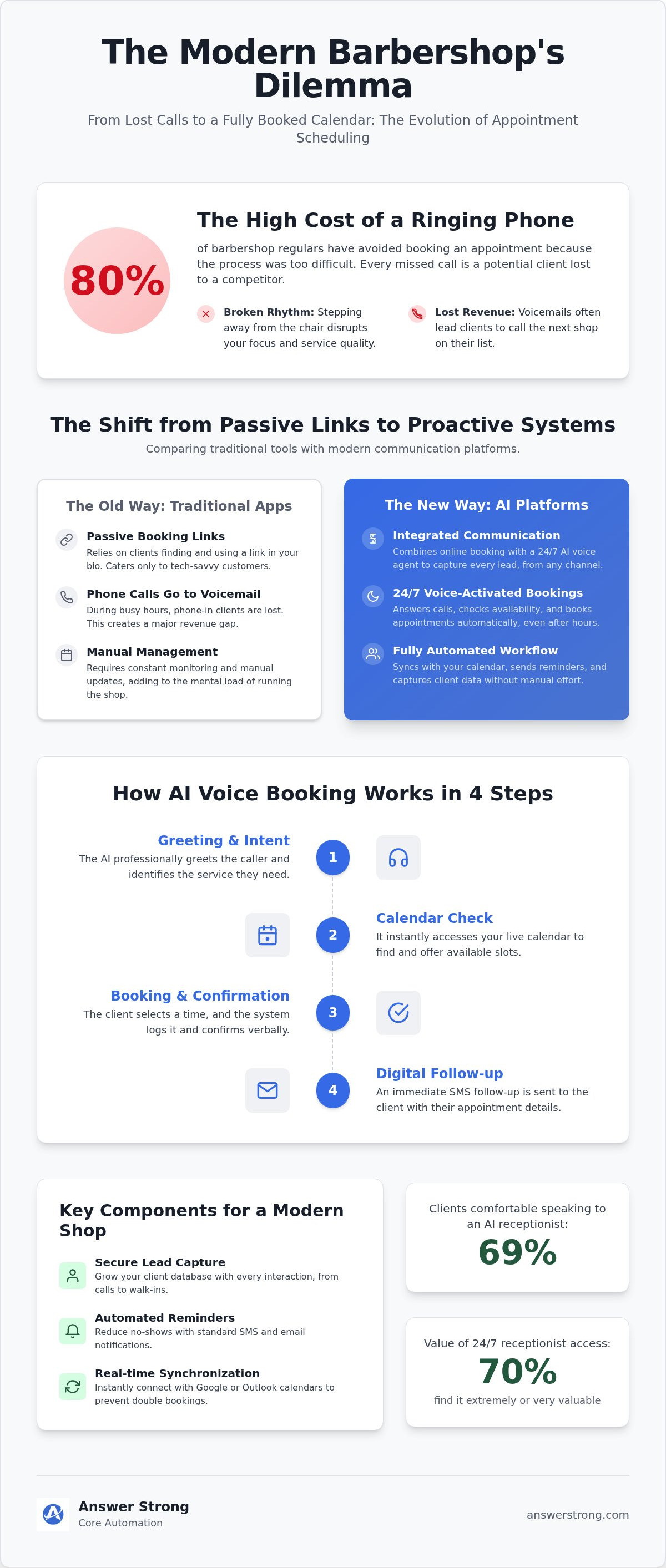
A typical automated booking workflow may look like this:
Step 1: Identify What the Customer Needs
The caller explains why they are contacting the shop.
For example:
“I need a haircut tomorrow.”
“Do you have anyone available this afternoon?”
“I need a haircut and beard trim.”
Step 2: Collect the Required Information
The system may collect approved details such as:
Customer name
Phone number
Requested service
Preferred barber
Preferred date
Preferred time
Step 3: Support the Scheduling Process
When supported scheduling tools and integrations are configured, the system can assist with appointment availability based on the shop's rules.
Step 4: Confirm the Next Step
Depending on the configuration, the customer may receive confirmation, instructions, or additional follow-up information.
Exact scheduling and communication functionality depends on the integrations and settings configured for the business.
Helping Customers Who Prefer to Call
Not every client wants to download another app or create another account.
Some simply prefer calling a business and asking a question.
A phone-based communication system can give those customers another way to interact with the shop.
Instead of forcing every customer through the same booking method, a barbershop can provide multiple options:
Online booking
Phone calls
Website inquiries
Walk-ins
Text communication where configured
Giving customers more than one way to interact with the business can create a more flexible experience.
Handling Routine Questions Automatically
Many barbershops receive the same questions repeatedly.
Examples include:
What are your hours?
Where are you located?
How much is a haircut?
Do you take walk-ins?
Do you offer beard trims?
Do you cut children's hair?
Which barbers are available?
What payment methods do you accept?
Core Automation can be configured with approved business information so routine questions can be answered consistently.
If a customer asks something outside the available information, the system can follow the shop's escalation rules rather than inventing an answer.
Traditional Booking Apps vs. Communication Automation
Traditional booking software and communication automation solve different problems.
A traditional booking app is primarily designed to help customers choose an appointment.
Communication automation can help businesses manage the conversations that happen before, during, and after that booking.
A traditional scheduling tool may focus on:
Available times
Staff calendars
Services
Appointment duration
Rescheduling
A broader communication system may also support:
Incoming calls
Frequently asked questions
Routing
Customer messages
After-hours inquiries
Lead information
Follow-up workflows
Appointment-related communication
For some barbershops, using both approaches together may provide a more complete customer experience.
The Cost of Disorganized Communication
Missed or poorly managed communication can create unnecessary friction for both customers and staff.
Examples include:
Customers calling repeatedly
Appointments being entered incorrectly
Two customers being given the same time
Messages being forgotten
Staff not knowing who should return a call
Customers receiving outdated pricing or hours
Important appointment details being missed
A more organized communication process can help reduce these issues.
The value comes from building a repeatable system, not from assuming automation will produce a guaranteed revenue increase.
Features to Prioritize in Barbershop Booking Software
The most useful system is not necessarily the one with the longest feature list.
Barbershops should prioritize functionality that solves real operational problems.
Important features may include:
Appointment scheduling
Service duration settings
Staff availability
Business hours
Customer information
Appointment reminders
Cancellation and rescheduling rules
Call routing
Customer messages
Activity logs
Approved FAQ information
Human escalation
The exact combination depends on the size and structure of the shop.
Setting Up a More Automated Barbershop
Building an organized communication system starts with defining how your shop already operates.
Step 1: Choose Your Business Phone Setup
AnswerStrong provides access to professional business phone numbers, including local and toll-free options subject to availability.
Depending on the existing provider and configuration, a shop may also be able to use an existing business number through call forwarding or supported number-transfer options.
Using a dedicated business number can help separate personal and business communication.
Step 2: Define Your Shop Hours
Set clear rules for:
Opening hours
Closing hours
Days off
Holidays
After-hours calls
Barber availability
These rules help determine what customers should experience at different times.
Step 3: Map Your Service Menu
Clearly define the services customers can request.
For example:
Standard haircut
Fade
Beard trim
Haircut and beard combination
Children's haircut
Specialty services
For each service, you may also define:
Approximate duration
Available staff
Scheduling restrictions
Pricing guidance
Required preparation
This helps create a more predictable booking workflow.
Step 4: Define Scheduling Rules
Your scheduling process may include:
Minimum notice
Maximum advance booking
Appointment duration
Buffer time between clients
Break periods
Cancellation policies
Rescheduling policies
These rules should reflect the way your actual shop operates.
Step 5: Build Your Knowledge Base
Provide approved information that customers frequently request.
This may include:
Address
Parking information
Business hours
Service descriptions
Pricing guidance
Walk-in policies
Payment methods
Cancellation rules
Staff information
Keeping this information current helps maintain consistent customer communication.
Step 6: Test the System
Before relying on automation with customers, test it.
Try calling and asking:
What time do you close?
Can I book a fade tomorrow?
Do you accept walk-ins?
How much is a beard trim?
Can I speak with the owner?
I need to cancel my appointment.
Testing helps identify gaps in your business information and routing rules.
Managing the Shop Through a Dashboard
A centralized dashboard can make it easier to review communication activity.
Depending on the available AnswerStrong features and account configuration, dashboard information may include:
Phone numbers
Call activity
Call history
Voicemail
Usage
Messages
Routing settings
Business-hours settings
Core Automation settings
Call recordings where enabled
Other communication activity
The dashboard should be viewed as a management tool rather than a promise that every shop function is controlled from one place.
Specific capabilities depend on the selected service and current platform availability.
Businesses interested in the available service options can explore AnswerStrong services.
AnswerStrong for Barbershops
AnswerStrong is a business communication platform that combines professional business phone services with Core Automation.
For barbershops, AnswerStrong can help create a more organized communication process around calls, appointments, questions, messages, and routine customer inquiries.
A shop may use AnswerStrong to support:
Professional local or toll-free phone numbers
Existing business numbers where supported
Call forwarding
Call routing
Business-hours rules
After-hours communication
Voicemail
Voicemail-to-email
Call activity
Fax-to-email where applicable
Core Automation
Customer information collection
Appointment-related workflows
Human escalation
The exact setup can be configured around the needs of the individual shop.
Why Core Automation Fits the Barbershop Workflow
Barbers work in an environment where interruptions matter.
Stopping in the middle of a cut to answer a routine question may disrupt both the barber and the customer.
AnswerStrong Core Automation can help manage repeatable interactions while allowing barbers to remain focused.
For example:
A customer asking for business hours may receive the approved answer.
A customer requesting an appointment may enter the shop's scheduling workflow.
A customer asking an unusual question may leave a detailed message.
A complicated or sensitive situation may be escalated to a person.
Automation handles the routine work.
People remain involved when human judgment matters.
Supporting Existing Receptionists and Staff
AnswerStrong does not have to replace an employee.
Some barbershops may already have:
A receptionist
Shop manager
Front-desk employee
Barber responsible for phone calls
Core Automation can provide additional coverage when those employees are unavailable.
Examples include:
Lunch breaks
Busy periods
After-hours calls
Weekends
Vacations
Sick days
Multiple incoming calls
Seasonal demand
This allows the existing team to focus on customers who need personal attention.
Helping Multi-Chair Shops Stay Organized
Communication becomes more complicated when a shop has multiple barbers.
Questions may include:
Which barber is available?
Who performs a particular service?
Which chair should receive the appointment?
Who needs to return a call?
A structured scheduling and routing system can help create clearer rules for these situations.
More advanced configurations may support multi-user or multi-location workflows depending on the selected service and setup.
Building a Better Customer Experience
The customer experience starts before someone sits in the chair.
It may begin when they:
Search for your shop
Visit your website
Call your number
Ask about pricing
Request an appointment
Send a message
A professional communication system helps make those early interactions feel organized.
That does not mean everything must be automated.
The strongest customer experience may combine:
Convenient self-service
Reliable automation
Professional business phone service
Human assistance when needed
Preparing Your Barbershop for Growth
As a barbershop grows, communication usually increases.
You may receive:
More calls
More appointments
More cancellations
More walk-in questions
More customer messages
More staff scheduling requests
Without a consistent process, those interactions can become difficult to manage.
Barbershop appointment booking software and communication automation can help create a structure that supports growth without requiring barbers to constantly step away from their clients.
Take Control of Your Shop's Communication
Your customers should have a clear way to contact your barbershop and understand what happens next.
A stronger system can help manage appointment requests, routine questions, call routing, business hours, customer information, and other repeatable communication.
AnswerStrong combines professional business phone services with Core Automation to help barbershops build a communication workflow around the way they actually operate.
The goal is simple:
Keep your shop responsive while keeping your attention where it belongs—on your clients and your craft.
Frequently Asked Questions
How does barbershop booking software help with no-shows?
Many booking systems support appointment reminders through email, SMS, or other communication methods. Reminder availability and functionality depend on the platform and configuration. Businesses should also define clear cancellation and rescheduling policies.
Can I keep my existing barbershop phone number?
Depending on your current provider and setup, you may be able to connect an existing number through call forwarding or supported number-transfer processes. Requirements and timelines vary by carrier and number type.
If you prefer a new number, you can also explore AnswerStrong business phone number options.
Does an automated system replace a receptionist?
Not necessarily. Some shops may use automation as primary communication support, while others may use it alongside an existing receptionist, manager, or staff member.
Can Core Automation answer customer questions?
Core Automation can be configured to answer approved questions based on information provided by the business. Questions outside that information can follow predefined escalation or message-taking rules.
How long does it take to set up Core Automation for a barbershop?
Setup time depends on the complexity of the shop's services and workflows. A configuration may require information about services, hours, appointment rules, staff availability, FAQs, routing instructions, and escalation preferences.
Can AnswerStrong work with my calendar?
Scheduling capabilities depend on the supported integrations and configuration available for your account. Businesses should verify currently supported calendar integrations before relying on a specific third-party platform.
Can the system handle multiple incoming calls?
Automated communication systems may support multiple simultaneous interactions depending on the platform configuration and technical capacity. Businesses should confirm the limits of their selected service.
What happens if the system cannot answer a question?
Core Automation can be configured to take a message, route the conversation, or escalate the interaction to a person based on the shop's rules.
Is automation cheaper than hiring a receptionist?
Costs vary. A receptionist involves wages and employment-related costs, while automation typically uses subscription-based pricing. The right choice depends on call volume, staffing needs, customer expectations, and the type of communication the shop needs to manage.
Can AnswerStrong help with after-hours calls?
Core Automation and business-hours routing can be configured to support customer communication outside normal shop hours.
Ready to Build a More Organized Barbershop Communication System?
AnswerStrong can help your shop manage professional phone communication, routine customer questions, appointment-related workflows, call routing, and after-hours communication.
Whether you operate independently or manage a multi-chair shop, AnswerStrong can help you build a communication system designed around the way your business works.


Comments